
A PDF generation API is the fastest way to add invoice, report, and certificate generation to your application — without managing a headless browser or PDF library. You store an HTML template once, call the API with JSON data, and get a PDF back in the response.
This tutorial shows how to integrate PDFPort — a template-based PDF generation API — using Node.js, Python, and curl. The free tier includes 50 renders/month with no credit card required.
Why Use a PDF Generation API Instead of a Library?
Self-hosted options like Puppeteer or wkhtmltopdf work, but they come with ongoing costs: server memory, version drift, crash recovery, and redeployments every time the PDF design changes. An API offloads all of that:
- No headless browser to provision or maintain
- Template updates happen in a dashboard — no code deploy required
- Consistent Chromium rendering across every environment
- Scales automatically without infrastructure changes
How PDFPort’s Template-Based PDF Generation API Works
Most HTML-to-PDF APIs require you to send the full HTML layout on every request. PDFPort works differently — the template lives on the platform, and your app only sends the data that changes:
POST /v1/render/:template_id
{ "data": { "client": "Acme Corp", "amount": "1,299.00" } }
← returns application/pdf
Change the invoice design in the PDFPort dashboard — no code change, no deploy, no downtime.
Step 1: Create a Template
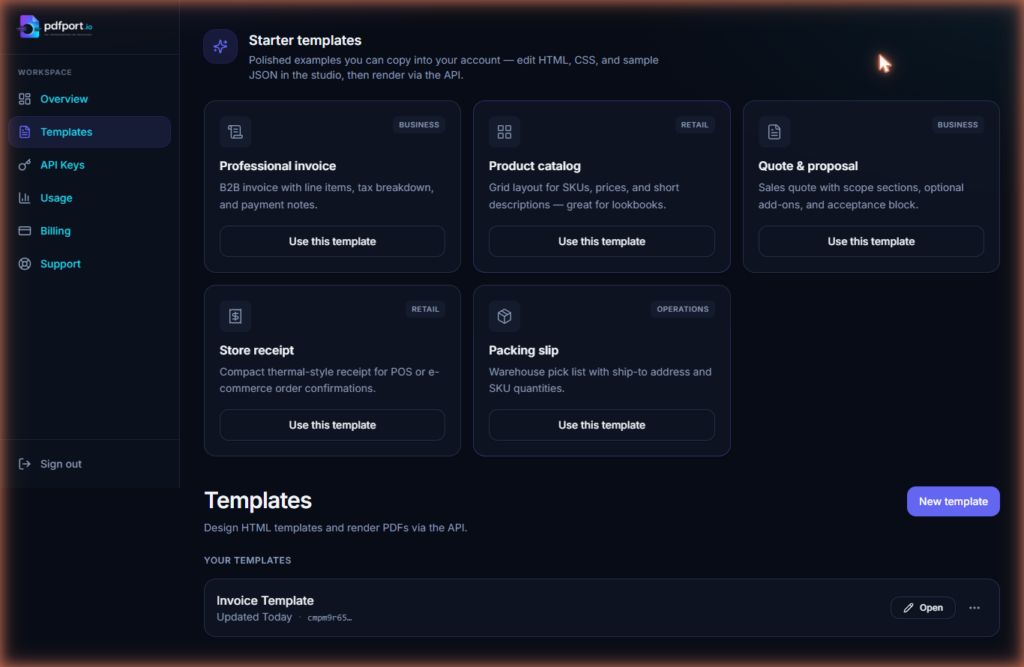
Sign up at pdfport.io. Five starter templates (invoice, receipt, quote, packing slip, product catalog) ship with every account. To create one via API:
curl -X POST https://api.pdfport.io/v1/templates \
  -H "Authorization: Bearer YOUR_API_KEY" \
  -H "Content-Type: application/json" \
  -d '{
    "name": "Invoice",
    "html": "<h1>Invoice #{{invoice_number}}</h1><p>Client: {{client}}</p><p>Amount: {{currency}}{{amount}}</p>"
  }'
The response includes a template_id. Use it on every render call.
Step 2: Render a PDF
curl
curl -X POST https://api.pdfport.io/v1/render/TEMPLATE_ID \
  -H "Authorization: Bearer YOUR_API_KEY" \
  -H "Content-Type: application/json" \
  -d '{
    "data": {
      "invoice_number": "INV-1042",
      "client": "Acme Corp",
      "currency": "$",
      "amount": "1,299.00"
    }
  }' \
  --output invoice.pdf
Node.js — PDF Generation API Call
const fs = require("fs");

async function renderPDF(templateId, data) {
  const res = await fetch(`https://api.pdfport.io/v1/render/${templateId}`, {
    method: "POST",
    headers: {
      Authorization: `Bearer ${process.env.PDFPORT_API_KEY}`,
      "Content-Type": "application/json",
    },
    body: JSON.stringify({ data }),
  });

  if (!res.ok) {
    throw new Error(`Render failed: ${res.status} ${await res.text()}`);
  }

  return Buffer.from(await res.arrayBuffer());
}

renderPDF("TEMPLATE_ID", {
  invoice_number: "INV-1042",
  client: "Acme Corp",
  currency: "$",
  amount: "1,299.00",
}).then((pdf) => fs.writeFileSync("invoice.pdf", pdf));
Python
import os
import requests

def render_pdf(template_id: str, data: dict) -> bytes:
    r = requests.post(
        f"https://api.pdfport.io/v1/render/{template_id}",
        headers={"Authorization": f"Bearer {os.environ['PDFPORT_API_KEY']}"},
        json={"data": data},
    )
    r.raise_for_status()
    return r.content

pdf = render_pdf("TEMPLATE_ID", {
    "invoice_number": "INV-1042",
    "client": "Acme Corp",
    "currency": "$",
    "amount": "1,299.00",
})

with open("invoice.pdf", "wb") as f:
    f.write(pdf)</code></pre></div>
Step 3: Serve the PDF from an Express Endpoint
const express = require("express");
const app = express();
app.use(express.json());

app.post("/invoices/:id/pdf", async (req, res) => {
  try {
    const invoice = await getInvoiceFromDB(req.params.id);

    const pdf = await renderPDF(process.env.INVOICE_TEMPLATE_ID, {
      invoice_number: invoice.number,
      client: invoice.client_name,
      currency: invoice.currency_symbol,
      amount: invoice.formatted_total,
    });

    res.setHeader("Content-Type", "application/pdf");
    res.setHeader(
      "Content-Disposition",
      `attachment; filename="invoice-${invoice.number}.pdf"`
    );
    res.send(pdf);
  } catch (err) {
    console.error(err);
    res.status(500).json({ error: "Could not generate PDF" });
  }
});
Step 4: Bulk Rendering with Webhooks
For batch jobs — end-of-month invoices, bulk certificates — the async bulk render endpoint accepts an array of data objects and posts a webhook when all PDFs are ready:
const res = await fetch("https://api.pdfport.io/v1/bulk-render", {
  method: "POST",
  headers: {
    Authorization: `Bearer ${process.env.PDFPORT_API_KEY}`,
    "Content-Type": "application/json",
  },
  body: JSON.stringify({
    template_id: "TEMPLATE_ID",
    webhook_url: "https://yourapp.com/webhooks/pdf-ready",
    renders: invoices.map((inv) => ({
      data: {
        invoice_number: inv.number,
        client: inv.client_name,
        amount: inv.formatted_total,
      },
    })),
  }),
});
Your webhook receives signed download URLs valid for 3 days. No polling required.
PDF Generation API: Production Checklist
Security
- Store your API key in an environment variable (
PDFPORT_API_KEY) — never in client-side code - Call the render endpoint server-side only
- Validate any user-supplied values before merging into template data
Reliability
- Retry on HTTP 429 (rate limit) and 5xx with exponential backoff
- Set a ~10 second timeout for single-page renders
- Use the bulk endpoint for jobs over ~10 PDFs
Performance
- Single renders typically return in under 1 second for a one-page document
- Cache responses for PDFs with static data — same inputs always produce the same output
PDFPort vs Self-Hosted Libraries
| PDFPort PDF generation API | Self-hosted (Puppeteer, wkhtmltopdf) | |
|---|---|---|
| Setup time | Minutes | Hours–days |
| Template updates | Dashboard, no deploy | Code change + deploy |
| Scaling | Handled for you | You manage |
| CSS support | Full (Chromium) | Varies by library |
| Cost | Free tier + $9/mo | Infrastructure costs |
If you want to explore more approaches, see our guide on choosing the right PDF library for your stack.
Getting Started
The free tier of this PDF generation API includes 50 renders per month — enough to validate your integration end-to-end.