
A while back, I was working on a project where the client — a restaurant management software company — wanted a chatbot integrated into their platform. The idea was simple: restaurant owners and managers should be able to ask plain English questions about their own business and get instant answers. Things like “How many orders came in today?“ or “What’s running low in the kitchen?“ The solution I landed on was to build an MCP server in Node.js — and it turned out to be exactly the right tool for the job.
The AI part was easy. Pick a model, wire up an API, done. The hard part was: how do you give the AI access to live restaurant data without building a custom integration for every question?
I didn’t want to write a prompt that stuffed the entire database into context. or hardcode a list of queries the AI could run. I wanted something clean — where the AI could figure out what data it needed and go fetch it on its own.
That’s when I came across MCP — the Model Context Protocol.
What is MCP?
MCP is an open standard published by Anthropic that gives AI models a structured way to discover and call external tools. Think of it like USB for AI — instead of every AI app needing a custom integration for every data source, MCP gives a single standard interface.
You build an MCP server that exposes tools (functions the AI can call). Any MCP-compatible AI client can then discover those tools and decide when to use them — without you having to hardcode anything.
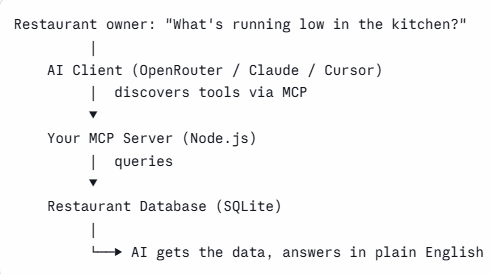
In our case: the MCP server talks to the restaurant database. The AI client talks to the MCP server. The restaurant owner just types a question.
What We’re Building
To demonstrate this, I built restaurant-mcp — a working MCP server that connects to a demo restaurant database (called Spice Garden) and exposes five tools the AI can use:
| Tool | What it does |
|---|---|
get_orders_summary | Order count and revenue for a given date |
get_inventory_status | Current stock levels for all items |
check_low_stock | Items below their reorder threshold |
get_popular_items | Best-selling dishes by quantity |
get_table_status | Which tables are occupied or free |
Pair this with a small Node.js chat client that connects to OpenRouter (free tier, DeepSeek model), and restaurant owners can query their data conversationally.
The full source is on GitHub: github.com/rick001/restaurant-mcp
Prerequisites
- Node.js 20.6+
- An OpenRouter API key (free tier works)
- Basic familiarity with Node.js
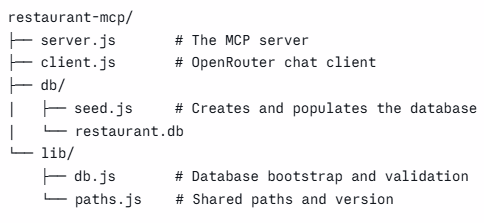
Project Structure
Step 1: Install Dependencies
mkdir restaurant-mcp && cd restaurant-mcp
npm init -y
npm install @modelcontextprotocol/sdk better-sqlite3 openai zod
Add "type": "module" to package.json for ES module support, and set engines to Node 20.6+ since we use --env-file later.
Step 2: Set Up the Database
We use SQLite via better-sqlite3 — no database server to run, just a file. The seed script creates four tables and populates them with realistic dummy data.
// db/seed.js (key excerpt)
import Database from "better-sqlite3";

const db = new Database("./db/restaurant.db");

db.exec(`
  CREATE TABLE IF NOT EXISTS orders (
    id INTEGER PRIMARY KEY,
    table_id INTEGER,
    item_id INTEGER,
    quantity INTEGER,
    total_price REAL,
    status TEXT,
    created_at TEXT
  );
  -- + menu_items, inventory, tables
`);
The seed data includes menu items (Butter Chicken, Biryani, Paneer Tikka…), 6 tables with mixed occupancy, inventory items with reorder thresholds, and 15 sample orders placed today at different times.
Run it once:
node db/seed.js
# Database seeded successfully
Step 3: Build the MCP Server
This is the core of the project. We create an McpServer instance and register tools on it. Each tool has a name, a description (this is what the AI reads to decide when to call it — write it clearly), an input schema using Zod, and a handler that queries the database.
// server.js
import { McpServer } from "@modelcontextprotocol/sdk/server/mcp.js";
import { StdioServerTransport } from "@modelcontextprotocol/sdk/server/stdio.js";
import { z } from "zod";
import { openDatabase } from "./lib/db.js";

const db = openDatabase();
const server = new McpServer({ name: "restaurant-mcp", version: "1.0.0" });

server.registerTool("get_orders_summary", {
  description: "Get total orders count and revenue for a specific date (YYYY-MM-DD). Use today's date if not specified.",
  inputSchema: {
    date: z.string().optional().describe("Date in YYYY-MM-DD format; defaults to today"),
  },
}, async ({ date }) => {
  const targetDate = date ?? new Date().toISOString().split("T")[0];

  const rows = db.prepare(`
    SELECT COUNT(*) as total_orders,
           SUM(total_price) as revenue,
           SUM(CASE WHEN status='pending' THEN 1 ELSE 0 END) as pending
    FROM orders WHERE DATE(created_at) = ?
  `).get(targetDate);

  return {
    content: [{ type: "text", text: JSON.stringify(rows) }],
  };
});
A few things worth noting here:
The tool description matters a lot. The AI uses it to decide whether to call your tool. "Get total orders count and revenue for a specific date" is much better than "query orders" — be specific about what it returns.
Validate inputs defensively. We clamp the limit parameter in get_popular_items to a range of 1–50 so a misbehaving model can’t request 10,000 rows:
const safeLimit = Math.min(Math.max(limit, 1), 50);At the end of server.js, connect via stdio transport — this is how MCP clients communicate with the server as a subprocess:
const transport = new StdioServerTransport();
await server.connect(transport);
Step 4: Build the Chat Client
The client does three things: connects to the MCP server, converts its tools into OpenAI-compatible function definitions, then runs an agentic loop with OpenRouter.
// client.js (key excerpt)
import { Client } from "@modelcontextprotocol/sdk/client/index.js";
import { StdioClientTransport } from "@modelcontextprotocol/sdk/client/stdio.js";
import OpenAI from "openai";

// Spin up the MCP server as a subprocess and connect to it
const transport = new StdioClientTransport({ command: "node", args: ["./server.js"] });
const mcpClient = new Client({ name: "restaurant-chat-client", version: "1.0.0" });
await mcpClient.connect(transport);

// Ask the MCP server what tools are available, then convert to OpenAI format
const { tools: mcpTools } = await mcpClient.listTools();
const openAiTools = mcpTools.map(tool => ({
  type: "function",
  function: {
    name: tool.name,
    description: tool.description,
    parameters: tool.inputSchema,
  },
}));

// OpenRouter uses the same API surface as OpenAI
const ai = new OpenAI({
  baseURL: "https://openrouter.ai/api/v1",
  apiKey: process.env.OPENROUTER_API_KEY,
});
The agentic loop is where the magic happens. We send the user’s message to the model along with the tool list. If the model decides to call a tool, we execute it via the MCP client, feed the result back, and call the model again — until it has everything it needs to answer:
while (true) {
  const response = await ai.chat.completions.create({
    model: process.env.OPENROUTER_MODEL,
    messages,
    tools: openAiTools,
    tool_choice: "auto",
  });

  const message = response.choices[0].message;
  messages.push(message);

  // No tool calls = final answer
  if (!message.tool_calls || message.tool_calls.length === 0) {
    console.log(`\nAssistant: ${message.content}\n`);
    break;
  }

  // Execute each tool call via the MCP server
  for (const toolCall of message.tool_calls) {
    const toolArgs = JSON.parse(toolCall.function.arguments);
    console.log(`  [calling tool: ${toolCall.function.name}]`);

    const result = await mcpClient.callTool({
      name: toolCall.function.name,
      arguments: toolArgs,
    });

    messages.push({
      role: "tool",
      tool_call_id: toolCall.id,
      content: result.content[0].text,
    });
  }
}
Step 5: Configure and Run
Create a .env file:
OPENROUTER_API_KEY=your_key_here
OPENROUTER_MODEL=deepseek/deepseek-chat-v3-0324:free
The model must support tool/function calling. The client validates this at startup by checking OpenRouter’s API, so you get a clear error with alternatives if your chosen model doesn’t qualify.
Seed the database and start chatting:
npm run seed
npm run chat
Seeing It in Action
Here is what a real session looks like:
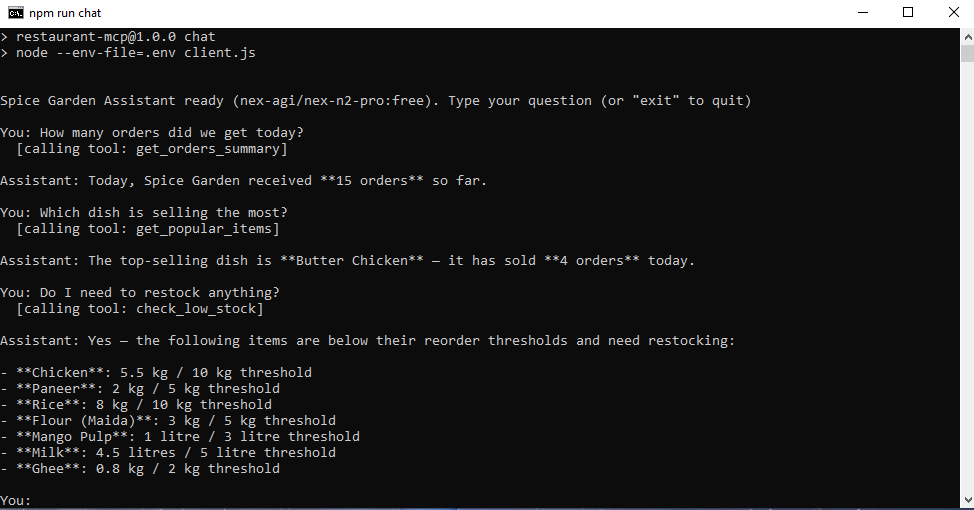
The AI is not guessing. It is calling your tools, getting real data, and answering in plain English.
Why MCP Over a Simple API?
You might be thinking: why not just expose a REST API and have the AI call that?
You could. But MCP gives you a few things a plain REST API does not:
Tool discovery is automatic. The AI client calls listTools() and gets everything your server exposes. No hardcoding which endpoints exist.
The schema travels with the tool. Each tool includes its input schema and description. The AI knows what parameters to pass and when to use it.
It works with any MCP-compatible client. The same server.js you built here works with Claude Desktop, Cursor, VS Code Copilot, or any other MCP client — not just your custom chat script.
Extending This Further
This demo uses static SQLite data, but the same pattern applies directly to a real production database. Swap better-sqlite3 for mysql2 or pg, point it at your live database, and the MCP server works identically.
A few tools you could add for a real restaurant system:
update_table_status— mark a table as free when guests leaveget_revenue_by_period— weekly or monthly revenue breakdownsget_staff_schedule— query who is on shift todaycreate_order— take a new order directly from the chat
The last one is worth pausing on. Once you expose write tools, the chatbot stops being read-only. A manager could say “Add 2 Butter Chicken to table 4” and the AI handles it. That is where MCP gets genuinely powerful.
Wrapping Up
The pattern here is simple but the implications are broad. Once you have an MCP server sitting in front of your data, any MCP-compatible AI can query it intelligently — without you writing prompt templates for every possible question.
For this restaurant chatbot project, MCP turned out to be exactly the right abstraction. The restaurant owner does not need to learn SQL. The AI does not need to be prompted with the entire database schema. They meet in the middle through a small Node.js server with five tools.
The full source, including the seed script and chat client, is on GitHub:
github.com/rick001/restaurant-mcp
Clone it, run npm run seed and npm run chat, and try it yourself.