
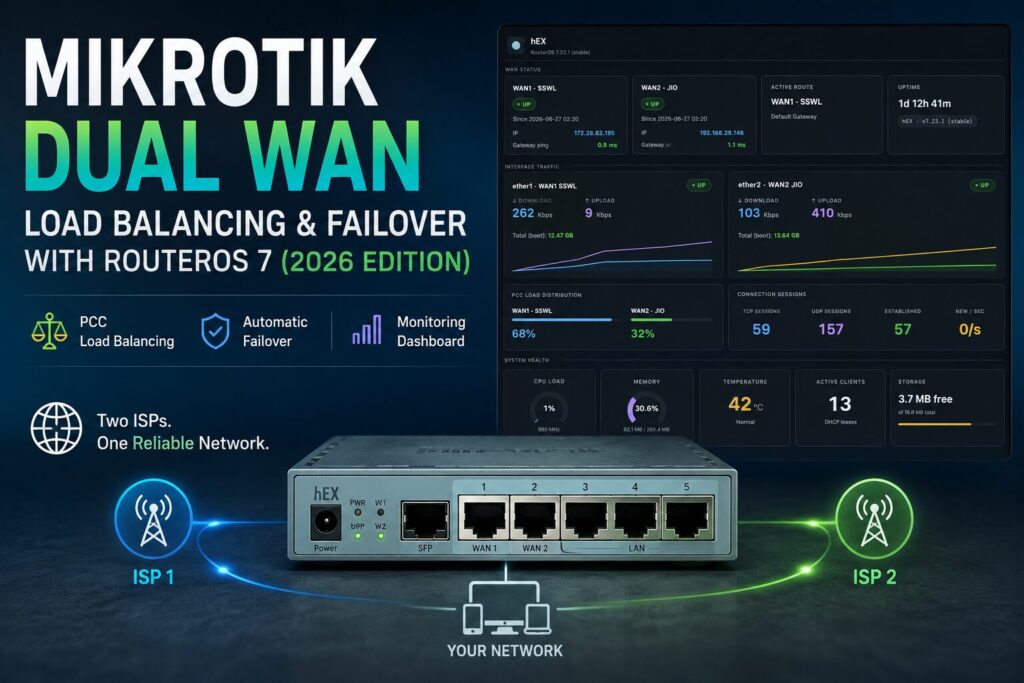
Looking for where this started? The original Dual WAN guide is still up.
This isn’t a polish pass on the old article. I rebuilt the router from scratch, ran it in production, and wrote down everything that broke, everything that surprised me, and every decision I’d make differently. If you followed the original guide and hit issues on RouterOS 7, that’s exactly what this covers.
Last year’s guide got a lot of traction. Readers emailed about routing marks that silently did nothing, PCC rules that cut off LAN access to the router itself, health checks that passed even when a WAN was dead, and DHCP gateways going stale mid-session. Rather than tack fixes onto an old article, I wiped the router, started from a blank config on RouterOS 7.23.1, and documented the whole thing properly.
Why Rewrite It?
Three things moved on since the original.
RouterOS 7 is a different beast. Routing tables no longer appear by magic when you reference them. The syntax changed. Mangle rule behaviour tightened up. Several things that worked silently in v6 now fail silently in v7, which is worse.
My network grew. I added a managed switch, a range extender, IP cameras, and an NVR. The original single-port LAN setup didn’t reflect any of that.
Production taught me things testing didn’t. Health checks that looked fine but would pass on a dead link. A DHCP gateway that went stale without any log entry. Mangle rules that became invalid the moment I bridged two ports. None of this showed up until the router had been running for a few months.
What Was Wrong With the Original Guide
The old guide worked on RouterOS 6. On v7, several parts of it break without any error message. That’s the frustrating kind of broken.
routing-mark= does nothing in RouterOS 7. In v6, writing routing-mark=to_WAN1 in a route created the table implicitly. In v7, you have to create the table first with /routing table add name=X fib, and the route syntax changed to routing-table=. If you use the old syntax, RouterOS accepts the command, the route looks correct in the list, and traffic ignores the policy table entirely.
No dst-address-type=!local on PCC rules kills LAN access to the router. Without this filter, the prerouting mangle rules stamp routing marks on traffic destined for the router itself, including DNS queries to 192.168.10.1, Winbox sessions, and DHCP responses. Those packets get misrouted. LAN clients can browse the web fine but can’t reach the router. It’s a common v7 complaint and a single missing parameter is the cause.
Health checks via 8.8.8.8 give false positives. When a WAN’s physical link drops, the /32 host route pinning 8.8.8.8 to that interface goes inactive. The Netwatch ping falls back to the main routing table, gets forwarded through the working WAN, reaches 8.8.8.8, and returns a reply. Netwatch marks the dead WAN as up. Pinging the gateway IP directly avoids this entirely since the gateway is only reachable via its own physical port.
WAN2 was on DHCP with no gateway update script. JIO occasionally assigns a different gateway on lease renewal. Every route pointing at the old gateway goes stale. WAN2 stops working, Netwatch keeps reporting it as up, and there’s no log entry explaining why.
The bridge interface trap. Once a physical interface becomes a bridge member, any mangle or filter rule referencing it by name is flagged INVALID and silently skipped. RouterOS shows a warning in the rule list, but the rule stays there looking normal. If you added rules before creating the bridge, every single one needs to be updated to reference bridge-lan, and then the router needs a reboot even after you fix them.
FastTrack was never disabled. FastTrack offloads established connections to the hardware fast path, bypassing the mangle table. PCC routing marks never get applied to fasttracked flows. On a single-WAN setup this is harmless. On dual-WAN with PCC it quietly undermines the whole thing.
The Network
Hardware: MikroTik RB750Gr3, RouterOS 7.23.1, 32GB microSD for persistent logs.
| Role | Interface | Mode | ISP / Device |
|---|---|---|---|
| WAN1 | ether1 | Static | SSWL · 172.28.62.195/24 · GW 172.28.62.1 |
| WAN2 | ether2 | DHCP | JIO · 192.168.29.148/24 · GW 192.168.29.1 |
| LAN Bridge | bridge-lan | Bridge | ether3 + ether4 + ether5 |
| Access Point | ether3 | Bridge port | TP-Link Archer C64 |
| Switch | ether4 | Bridge port | TP-Link TL-SG105E |
| Spare | ether5 | Bridge port | Available |
LAN: 192.168.10.0/24 · Router at 192.168.10.1 · DHCP pool 192.168.10.100–200
Everything below .100 is reserved for static leases: NVR, switch, AP, range extender, three cameras. Dynamic clients get the .100–.200 range.
Design Decisions
Most guides just show the commands. Here’s why I made each call.
PCC over ECMP
ECMP splits packets across both WANs, which means different packets from the same TCP connection can exit through different links. Return traffic arrives asymmetrically and most applications break. PCC hashes the source and destination address pair for each new connection and pins that connection to one WAN for its lifetime. The split is roughly 50/50, but each connection stays on a single path. Later packets in the same flow already carry the connection mark so they don’t get re-hashed.
Ping gateway IPs, not public IPs
Suppose your Netwatch probe is pointed at 8.8.8.8 via a /32 host route through WAN1, and WAN1 goes down. The host route becomes inactive, the probe falls back to the main table, gets forwarded through WAN2, and returns a reply. Netwatch thinks WAN1 is fine. The gateway IP doesn’t have this problem. 172.28.62.1 is only reachable via ether1. When ether1 goes down, the gateway stops responding within a few seconds.
No FastTrack
FastTrack bypasses the mangle table for established connections, which means PCC marks stop being applied. The connection gets routed by the main table rather than the policy table. On dual-WAN that’s a problem. Disable it before touching anything else:
/ip firewall filter disable [find where action=fasttrack-connection]
Explicit routing tables
RouterOS 7 won’t create routing tables on the fly. You have to declare them before any route or mangle rule can reference them. The fib flag matters too: without it the table exists but routes in it aren’t used for actual forwarding. Two commands, easy to miss, breaks everything if you skip them.
SD card for logs
The RB750Gr3’s in-memory log clears on reboot. A WAN failure at 3am leaves no trace by morning. A 32GB microSD solves this. I run two targets: a general syslog and a separate WAN failover log that records every UP/DOWN event from the Netwatch scripts. When someone asks “why did the router switch WANs last Tuesday”, I can actually check.
DHCP script on WAN2
JIO renews its DHCP leases and sometimes hands out a different gateway. When that happens, every route pointing at the old gateway stops working. The DHCP client script runs on every lease event and updates the gateway IP in the WAN2 routing table route, the main table fallback route, and the health-check host route. No manual fix required.
How This Differs From Most Guides
| Most guides | This guide |
|---|---|
| RouterOS 6 | RouterOS 7.23.1, verified |
| Static gateways on both WANs | Mixed static + DHCP with automatic gateway renewal |
| Health check pings 8.8.8.8 | Netwatch pings gateway IPs (no false positives) |
routing-mark= (v6 syntax) | routing-table= with explicit /routing table add fib |
| No local traffic filter | dst-address-type=!local on all prerouting PCC rules |
| Bridge trap not mentioned | Full warning with fix procedure |
| Single LAN port | Bridge across three ports: AP, switch, spare |
| No logging | SD card with dedicated WAN failover log |
| FastTrack left enabled | FastTrack disabled |
| Config only | Deployment guide + troubleshooting reference |
The Configuration
Paste each block into the RouterOS terminal via SSH or Winbox Terminal. Lines starting with
#are comments and are safe to include. This assumes a clean router. If you’re starting from an existing config, reset first.
/system reset-configuration no-defaults=yes skip-backup=yes
The router reboots. Give it about 30 seconds before reconnecting.
Step 1 – Label Your Interfaces
Do this first. Every step that follows references these names and getting them wrong early causes confusing failures later.
/interface set ether1 comment="WAN1-SSWL-Static"
/interface set ether2 comment="WAN2-JIO-DHCP"
/interface set ether3 comment="AP-ArcherC64"
/interface set ether4 comment="Switch-tl-sg105e"
/interface set ether5 comment="Spare"
Verify with /interface print.
Step 2 – Assign WAN1 Static IP
/ip address add \
    address=172.28.62.195/24 \
    interface=ether1 \
    comment="WAN1"
Step 3 – Configure WAN2 DHCP Client
Set add-default-route=no and use-peer-dns=no. If you let RouterOS auto-add a default route from the DHCP lease, it conflicts with the policy routing tables you’ll set up in a few steps.
/ip dhcp-client add \
    interface=ether2 \
    add-default-route=no \
    use-peer-dns=no \
    disabled=no \
    comment="WAN2 JIO"
Wait a few seconds then check the lease bound:
/ip dhcp-client print detail
Note the gateway value from the output. You’ll need it when setting up the routes.
Step 4 – Create the LAN Bridge
Read this before running anything. The moment a physical port becomes a bridge member, every firewall or mangle rule referencing that port by name gets flagged INVALID and is silently skipped. RouterOS warns you in the rule list but the rule stays there looking active. If you add mangle rules before creating the bridge, you’ll need to fix each one to reference
bridge-laninstead, then reboot. The reboot is required even after fixing the rules. Create the bridge first, add the rules after.
# Create bridge
/interface bridge add name=bridge-lan comment="LAN Bridge"

# Add ports
/interface bridge port add interface=ether3 bridge=bridge-lan
/interface bridge port add interface=ether4 bridge=bridge-lan
/interface bridge port add interface=ether5 bridge=bridge-lan

# Assign LAN IP to bridge
/ip address add \
    address=192.168.10.1/24 \
    interface=bridge-lan \
    comment="LAN"
Step 5 – DNS
allow-remote-requests=yes turns the router into a DNS server for LAN clients. Without it, clients need to be pointed directly at an upstream resolver, which bypasses the router’s cache.
/ip dns set \
    servers=8.8.8.8,1.1.1.1 \
    allow-remote-requests=yes \
    cache-max-ttl=1d
Step 6 – DHCP Server for LAN
Addresses below .100 are reserved for static leases (cameras, NVR, AP, switch). Dynamic clients get the .100–.200 range.
/ip pool add \
    name=lan-pool \
    ranges=192.168.10.100-192.168.10.200

/ip dhcp-server add \
    name=lan-dhcp \
    interface=bridge-lan \
    address-pool=lan-pool \
    lease-time=12h \
    disabled=no

/ip dhcp-server network add \
    address=192.168.10.0/24 \
    gateway=192.168.10.1 \
    dns-server=192.168.10.1 \
    comment="LAN"
Step 7 – Firewall
RouterOS evaluates filter rules top to bottom and stops at the first match. Order matters. One thing worth calling out: my WAN1 ISP has a management portal at 10.254.254.8, which falls inside the 10.0.0.0/8 RFC1918 range. The ISP portal exception has to appear before the RFC1918 drop rules, otherwise it gets caught.
/ip firewall filter

# --- INPUT chain ---

add chain=input \
    connection-state=established,related,untracked \
    action=accept \
    comment="Accept established/related/untracked"

add chain=input \
    connection-state=invalid \
    action=drop \
    comment="Drop invalid"

add chain=input \
    in-interface=bridge-lan \
    action=accept \
    comment="Accept from LAN"

add chain=input \
    in-interface=lo \
    action=accept \
    comment="Accept loopback"

# Must appear before RFC1918 drops -- 10.254.254.8 is in 10.0.0.0/8
add chain=input \
    src-address=10.254.254.8/32 \
    in-interface=ether1 \
    action=accept \
    comment="Allow WAN1 ISP portal"

add chain=input src-address=10.0.0.0/8     in-interface=ether1 action=drop comment="Drop RFC1918 src on WAN1"
add chain=input src-address=172.16.0.0/12  in-interface=ether1 action=drop comment="Drop RFC1918 src on WAN1"
add chain=input src-address=192.168.0.0/16 in-interface=ether1 action=drop comment="Drop RFC1918 src on WAN1"
add chain=input src-address=10.0.0.0/8     in-interface=ether2 action=drop comment="Drop RFC1918 src on WAN2"
add chain=input src-address=172.16.0.0/12  in-interface=ether2 action=drop comment="Drop RFC1918 src on WAN2"
add chain=input src-address=192.168.0.0/16 in-interface=ether2 action=drop comment="Drop RFC1918 src on WAN2"

add chain=input protocol=icmp limit=10,20:packet action=accept comment="Allow ICMP rate limited"
add chain=input protocol=icmp action=drop comment="Drop excess ICMP"

add chain=input \
    action=drop \
    comment="Drop all other input"


# --- FORWARD chain ---

add chain=forward \
    connection-state=established,related,untracked \
    action=accept \
    comment="Accept established/related/untracked"

add chain=forward \
    connection-state=invalid \
    action=drop \
    comment="Drop invalid"

add chain=forward \
    in-interface=bridge-lan \
    out-interface=ether1 \
    action=accept \
    comment="LAN to WAN1"

add chain=forward \
    in-interface=bridge-lan \
    out-interface=ether2 \
    action=accept \
    comment="LAN to WAN2"

add chain=forward \
    src-address=10.254.254.8/32 \
    in-interface=ether1 \
    action=accept \
    comment="Allow WAN1 ISP portal"

add chain=forward src-address=10.0.0.0/8     in-interface=ether1 action=drop comment="Drop RFC1918 src on WAN1"
add chain=forward src-address=172.16.0.0/12  in-interface=ether1 action=drop comment="Drop RFC1918 src on WAN1"
add chain=forward src-address=192.168.0.0/16 in-interface=ether1 action=drop comment="Drop RFC1918 src on WAN1"
add chain=forward src-address=10.0.0.0/8     in-interface=ether2 action=drop comment="Drop RFC1918 src on WAN2"
add chain=forward src-address=172.16.0.0/12  in-interface=ether2 action=drop comment="Drop RFC1918 src on WAN2"
add chain=forward src-address=192.168.0.0/16 in-interface=ether2 action=drop comment="Drop RFC1918 src on WAN2"

add chain=forward \
    action=drop \
    comment="Drop all other forward"
Step 8 – NAT
Two rules. One per WAN. You’ll see guides that add action=accept rules in the NAT prerouting chain to avoid “double NAT”. Don’t. Those rules skip DNAT processing, which does nothing useful here since there are no DNAT rules to begin with. Policy routing bypass belongs in the mangle chain, which is the next step.
/ip firewall nat

add chain=srcnat \
    out-interface=ether1 \
    action=masquerade \
    comment="NAT WAN1"

add chain=srcnat \
    out-interface=ether2 \
    action=masquerade \
    comment="NAT WAN2"
Step 9 – Create Routing Tables (v7 Requirement)
This step has no equivalent in v6 guides and its absence is the most common cause of silent failure on RouterOS 7. The tables must exist before any route or mangle rule can reference them. The fib flag is required to actually forward packets through the table, not just store routes in it.
/routing table add name=WAN1 fib disabled=no
/routing table add name=WAN2 fib disabled=no
Confirm both show up alongside main:
/routing table print
Step 10 – Load Balancing (Mangle / PCC)
New connections from the LAN arrive in prerouting. PCC hashes the source and destination address pair and assigns the connection to bucket 0 (WAN1) or bucket 1 (WAN2), roughly 50/50. A connection mark gets stamped and persists for the connection’s lifetime. A routing mark then directs packets to the correct policy table. When the next packet in that connection arrives, it already has the connection mark, so PCC doesn’t re-hash it.
There are matching rules for the router’s own outbound traffic in the output chain, and INPUT chain rules to mark inbound connections from each WAN so replies leave through the right interface.
dst-address-type=!local is not optional. Without it, the prerouting mangle rules apply routing marks to packets destined for the router itself. DNS queries, Winbox sessions, DHCP responses all get misrouted. LAN clients lose access to the router while the internet still works, which makes it hard to diagnose. One parameter, but it’s the difference between a working setup and a broken one.
/ip firewall mangle

# ---------------------------------------------------------------
# PREROUTING -- bypass PCC for directly-connected subnets and
# the ISP portal to prevent routing loops.
# ---------------------------------------------------------------

add chain=prerouting \
    in-interface=bridge-lan \
    dst-address=10.254.254.8/32 \
    action=accept \
    comment="Bypass PCC: WAN1 ISP portal (prerouting)"

add chain=prerouting \
    in-interface=bridge-lan \
    dst-address=172.28.62.0/24 \
    action=accept \
    comment="Bypass policy routing: WAN1 subnet"

add chain=prerouting \
    in-interface=bridge-lan \
    dst-address=192.168.29.0/24 \
    action=accept \
    comment="Bypass policy routing: WAN2 subnet"


# ---------------------------------------------------------------
# INPUT -- mark connections arriving from each WAN so replies
# leave via the same interface they came in on.
# ---------------------------------------------------------------

add chain=input \
    connection-state=new \
    in-interface=ether1 \
    action=mark-connection \
    new-connection-mark=WAN1-conn \
    passthrough=yes \
    comment="Mark new inbound WAN1 connections"

add chain=input \
    connection-state=new \
    in-interface=ether2 \
    action=mark-connection \
    new-connection-mark=WAN2-conn \
    passthrough=yes \
    comment="Mark new inbound WAN2 connections"


# ---------------------------------------------------------------
# OUTPUT -- bypass PCC for subnets and ISP portal so the
# router's own Netwatch pings exit via the correct interface.
# These must come before the PCC output rules below.
# ---------------------------------------------------------------

add chain=output \
    dst-address=10.254.254.8/32 \
    action=accept \
    comment="Bypass PCC: WAN1 ISP portal"

add chain=output \
    dst-address=172.28.62.0/24 \
    action=accept \
    comment="Bypass PCC: WAN1 subnet (output)"

add chain=output \
    dst-address=192.168.29.0/24 \
    action=accept \
    comment="Bypass PCC: WAN2 subnet (output)"


# ---------------------------------------------------------------
# OUTPUT -- PCC for the router's own outbound connections.
# ---------------------------------------------------------------

add chain=output \
    connection-mark=no-mark \
    connection-state=new \
    per-connection-classifier=both-addresses:2/0 \
    action=mark-connection \
    new-connection-mark=WAN1-conn \
    passthrough=yes \
    comment="WAN1-pcc router output"

add chain=output \
    connection-mark=no-mark \
    connection-state=new \
    per-connection-classifier=both-addresses:2/1 \
    action=mark-connection \
    new-connection-mark=WAN2-conn \
    passthrough=yes \
    comment="WAN2-pcc router output"


# ---------------------------------------------------------------
# PREROUTING -- PCC for LAN outbound connections.
# connection-state=new: only classify new connections.
# connection-mark=no-mark: skip connections already classified.
# dst-address-type=!local: skip traffic destined for the router
# itself (DNS, DHCP, Winbox, SSH). Required in RouterOS 7.
# ---------------------------------------------------------------

add chain=prerouting \
    connection-mark=no-mark \
    connection-state=new \
    dst-address-type=!local \
    in-interface=bridge-lan \
    per-connection-classifier=both-addresses:2/0 \
    action=mark-connection \
    new-connection-mark=WAN1-conn \
    passthrough=yes \
    comment="WAN1-pcc LAN"

add chain=prerouting \
    connection-mark=no-mark \
    connection-state=new \
    dst-address-type=!local \
    in-interface=bridge-lan \
    per-connection-classifier=both-addresses:2/1 \
    action=mark-connection \
    new-connection-mark=WAN2-conn \
    passthrough=yes \
    comment="WAN2-pcc LAN"


# ---------------------------------------------------------------
# Routing marks -- tells the routing engine which policy table
# to use for forwarding.
# ---------------------------------------------------------------

add chain=output \
    connection-mark=WAN1-conn \
    action=mark-routing \
    new-routing-mark=WAN1 \
    passthrough=yes \
    comment="Route WAN1-conn via WAN1 table (output)"

add chain=prerouting \
    connection-mark=WAN1-conn \
    in-interface=bridge-lan \
    action=mark-routing \
    new-routing-mark=WAN1 \
    passthrough=yes \
    comment="Route WAN1-conn via WAN1 table (prerouting)"

add chain=output \
    connection-mark=WAN2-conn \
    action=mark-routing \
    new-routing-mark=WAN2 \
    passthrough=yes \
    comment="Route WAN2-conn via WAN2 table (output)"

add chain=prerouting \
    connection-mark=WAN2-conn \
    in-interface=bridge-lan \
    action=mark-routing \
    new-routing-mark=WAN2 \
    passthrough=yes \
    comment="Route WAN2-conn via WAN2 table (prerouting)"
Step 11 – Routing
Three sets of routes. Each serves a specific purpose:
| Set | Purpose |
|---|---|
| Per-WAN routing tables | Used by mangle-marked connections to exit a specific WAN |
| Main table defaults | Handle unmarked traffic; WAN1 preferred, WAN2 backup. Netwatch adjusts distances on failover |
| Health-check host routes | /32 routes that pin Netwatch probes to a specific physical interface |
Per-WAN routing tables. Note routing-table= here, not the v6 routing-mark=:
/ip route

add dst-address=0.0.0.0/0 \
    gateway=172.28.62.1 \
    routing-table=WAN1 \
    distance=1 \
    comment="WAN1 table default"

add dst-address=0.0.0.0/0 \
    gateway=192.168.29.1 \
    routing-table=WAN2 \
    distance=1 \
    comment="WAN2 table default"
Main table defaults. WAN1 at distance=1, WAN2 at distance=2. The Netwatch failover scripts raise the dead WAN’s distance to 10 and lower the surviving WAN to 1:
add dst-address=0.0.0.0/0 \
    gateway=172.28.62.1 \
    distance=1 \
    comment="WAN1-main"

add dst-address=0.0.0.0/0 \
    gateway=192.168.29.1 \
    distance=2 \
    comment="WAN2-main"
Health-check host routes. These /32 routes pin Netwatch probes to a specific physical interface regardless of what the main table says. Without them, a probe for WAN1 can leak through WAN2 and return a false positive:
add dst-address=8.8.8.8/32 \
    gateway=172.28.62.1 \
    comment="WAN1 health check route"

add dst-address=10.254.254.8/32 \
    gateway=172.28.62.1 \
    comment="WAN1 ISP portal"

add dst-address=1.1.1.1/32 \
    gateway=192.168.29.1 \
    comment="WAN2 health check route"
Check all routes are active:
/ip route print
Step 12 – Automatic Failover (Netwatch)
Netwatch pings each gateway every 10 seconds. Three missed probes fires the down-script. A successful probe after that fires the up-script.
When a WAN goes down, the script disables the per-WAN routing table route (so marked connections fall back to the main table), disables PCC mangle rules for that WAN (so no new connections get assigned to the dead link), and promotes the surviving WAN to distance=1 in the main table. Recovery reverses all of that.
/tool netwatch add \
    host=172.28.62.1 \
    interval=10s \
    timeout=3s \
    up-script={
        /log info "WAN1 UP - restoring routes and mangle rules"
        /ip route enable [find comment="WAN1 table default"]
        /ip route set [find comment="WAN1-main"] distance=1
        /ip route set [find comment="WAN2-main"] distance=2
        /ip firewall mangle enable [find comment~"WAN1-pcc"]
    } \
    down-script={
        /log info "WAN1 DOWN - disabling routes and mangle rules"
        /ip route disable [find comment="WAN1 table default"]
        /ip route set [find comment="WAN1-main"] distance=10
        /ip route set [find comment="WAN2-main"] distance=1
        /ip firewall mangle disable [find comment~"WAN1-pcc"]
    } \
    comment="WAN1 health check"

/tool netwatch add \
    host=192.168.29.1 \
    interval=10s \
    timeout=3s \
    up-script={
        /log info "WAN2 UP - restoring routes and mangle rules"
        /ip route enable [find comment="WAN2 table default"]
        /ip route set [find comment="WAN2-main"] distance=2
        /ip firewall mangle enable [find comment~"WAN2-pcc"]
    } \
    down-script={
        /log info "WAN2 DOWN - disabling routes and mangle rules"
        /ip route disable [find comment="WAN2 table default"]
        /ip route set [find comment="WAN2-main"] distance=10
        /ip firewall mangle disable [find comment~"WAN2-pcc"]
    } \
    comment="WAN2 health check"
Step 13 – Handle WAN2 DHCP Gateway Changes
Attach this script to the WAN2 DHCP client. It runs on every lease event and updates the three routes that carry the gateway IP. If JIO renews with a different gateway, the routes update automatically.
/ip dhcp-client set [find interface=ether2] \
    script={
        :local gw $"gateway-address"
        :if ($gw != "") do={
            /ip route set [find comment="WAN2 table default"] gateway=$gw
            /ip route set [find comment="WAN2-main"] gateway=$gw
            /ip route set [find comment="WAN2 health check route"] gateway=$gw
            /log info ("WAN2 DHCP: gateway updated to " . $gw)
        }
    }
Step 14 – SD Card Logging
# General system log
/system logging action set disk disk-file-name=sd1-part1/syslog
/system logging add action=disk topics=info

# Dedicated WAN failover log
/system logging action add name=wanlog target=disk disk-file-name=sd1-part1/wan-failover
/system logging add action=wanlog topics=script comment="WAN failover events to SD"
Logging action names can’t contain hyphens.
wanlogworks.wan-logfails with “action name can contain only letters and numbers”. Easy to miss inside a longer script.
To watch failover events live:
log print where topics~"script"
Verification
Run these in order. If one fails, don’t move on until it’s resolved.
Interfaces and IPs:
/ip address print
# Expected: 172.28.62.195/24 on ether1, DHCP address on ether2, 192.168.10.1/24 on bridge-lan
Routing tables:
/routing table print
# Expected: WAN1, WAN2 with fib flag, plus main
Gateway pings and internet reachability:
/ping 172.28.62.1 count=4     # WAN1 gateway
/ping 192.168.29.1 count=4   # WAN2 gateway
/ping 8.8.8.8 count=4        # Internet via WAN1 (pinned by /32 host route)
/ping 1.1.1.1 count=4        # Internet via WAN2 (pinned by /32 host route)
DNS and DHCP:
/ip dns cache flush
/resolve google.com
/ip dhcp-server lease print
Netwatch:
/tool netwatch print
# Both entries should show status: up
Load balancing: Open a browser on two different LAN clients and go to https://api.ipify.org. If PCC is working, the two clients will show different public IPs. With a small number of devices you might occasionally see the same IP; PCC distributes by connection hash and the spread evens out over more connections.
Failover test:
- Disconnect the WAN1 cable, or run
/interface disable ether1. - Wait ~30 seconds for three missed Netwatch intervals.
- Run
/log printand confirm “WAN1 DOWN” appears. - Ping from a LAN client. It should route through WAN2.
- Reconnect WAN1 and confirm “WAN1 UP” appears in the log.
Repeat the same test for WAN2.
The Speed Test
WAN1 (SSWL) is subscribed at 125 Mbps. WAN2 (JIO) is 100 Mbps. That’s 225 Mbps combined.
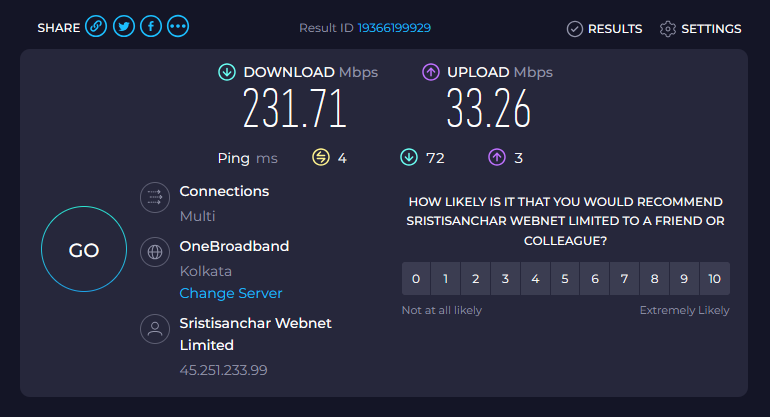
231.71 Mbps. Slightly over the theoretical combined capacity, which sits within normal variance at these speeds.
The reason a single-connection download won’t show this: PCC assigns each TCP connection to one WAN and keeps it there. One download, one WAN, capped at that link’s speed. The speed test uses multiple parallel connections. Each one gets hashed by PCC, some land on WAN1, some on WAN2, and both links contribute simultaneously. That’s where the aggregate comes from.
What I Found in Production
PCC distributes by connection, not device. A single laptop browsing 20 tabs will use both WANs at the same time, because each tab opens its own TCP connections and PCC hashes them independently. If all traffic appears to be going through one WAN, check that both sets of PCC mangle rules are enabled: /ip firewall mangle print.
The bridge trap is real. I hit it. I had mangle rules pointing at ether3, created the bridge, and suddenly had no LAN connectivity. The rules looked active in the list. Nothing in the log explained what was wrong. Fixed the rules, still broken. Rebooted, worked fine. The reboot requirement after fixing INVALID mangle rules isn’t obvious.
Check your ISP’s addresses before writing RFC1918 drops. My WAN1 ISP portal sits at 10.254.254.8, which is inside 10.0.0.0/8. Without a specific accept rule above the RFC1918 drops, the portal is unreachable. This applies to any ISP that uses private address space for management interfaces, which is more common than you’d expect.
The logging action name restriction will catch you off guard. wan-log looks like a perfectly reasonable name. RouterOS rejects it because action names can only contain letters and numbers. The error is clear enough but it’s easy to miss when you’re pasting a block of script. Use wanlog.
Mistakes I Made
Added firewall rules before the bridge. Spent an embarrassing amount of time finding the I flags in /ip firewall mangle print without-paging. Fixed all the rules. Still broken. Rebooted. Worked.
Used routing-mark= from the old guide. No error. RouterOS accepted the command. The routes appeared correct. Traffic ignored the policy tables entirely. Took a while to connect the symptom to the cause.
Forgot to create the routing tables before the routes. Same class of problem: no error, silently broken. If you add a route with routing-table=WAN1 before running /routing table add name=WAN1 fib, the route doesn’t behave as expected.
Tested failover by pinging 8.8.8.8 from the router. This is pointless for the reason already covered: when WAN1 dies, the /32 host route for 8.8.8.8 goes inactive and the ping exits via WAN2 instead. The test passes and WAN1 looks fine. Unplug the cable and watch the Netwatch log. That’s the real test.
Troubleshooting Reference
| Symptom | Where to look |
|---|---|
| No internet on LAN | /ip route print — both defaults active? |
Can’t reach router from LAN (192.168.10.1) | /ip firewall mangle print without-paging — look for I (INVALID) flags. Fix with set N in-interface=bridge-lan for each affected rule, then reboot. |
| All traffic going through one WAN | /ip firewall mangle print — both PCC rule sets enabled? |
| WAN2 Netwatch false DOWN | Check output chain bypass rules exist before the PCC output rules. Missing bypass for WAN2 subnet causes Netwatch pings to route via WAN1. |
| WAN2 gateway stale after lease renewal | /ip dhcp-client print detail — check gateway. DHCP script should update it automatically on next event. |
| Routing tables missing | /routing table print — if WAN1/WAN2 aren’t listed, re-run Step 9. |
| PCC rules not matching | FastTrack likely still enabled. /ip firewall filter print, find any fasttrack-connection rule, disable it. |
ISP portal (10.254.254.8) unreachable | ISP portal accept rule must appear above the RFC1918 drop rules in both input and forward chains. |
| WAN failover log not writing | Logging action name contains a hyphen. Use wanlog not wan-log. |
| New firewall rules never match | Rules added with plain add land after the catch-all drop. Use place-before=N where N is the drop-all rule’s position number. |
What’s Next: Building the Dashboard
The router runs a monitoring dashboard in Winbox showing live WAN status, connection counts, per-interface traffic graphs, Netwatch state, and DHCP lease activity. When a WAN goes down, it’s visible within seconds.
I’m documenting that setup in a separate article, covering what each widget shows, why I chose those metrics, and how to build it on your own RB750Gr3 or similar hardware. Subscribe below or follow Techbreeze on socials to catch it when it’s out.
RouterOS v7 vs v6: The Key Differences
| Feature | RouterOS v6 | RouterOS v7 |
|---|---|---|
| Create routing table | Implicit on reference | Explicit: /routing table add name=X fib |
| Route to specific table | routing-mark=X in /ip route | routing-table=X in /ip route |
| Mangle routing mark | new-routing-mark=X | Unchanged |
| Local traffic protection | Optional | Required: dst-address-type=!local on prerouting PCC rules |
| FastTrack with dual WAN | Mostly harmless | Must be disabled for PCC to work |
Download
The complete .rsc export from this router is available below. It’s the exact production config described in this guide with all comments intact.
To import: copy the file to the router via Winbox Files, then run
/import file=rb750gr3-final.rscin the terminal. Review it before importing. The IP addresses are specific to my ISPs and LAN subnet, so you’ll need to adapt WAN1 static IP, WAN2 DHCP, and192.168.10.0/24to match your network.
Built and tested on a MikroTik RB750Gr3 running RouterOS 7.23.1 with two live ISP connections: SSWL (static) on ether1 and JIO (DHCP) on ether2. Running in daily production use.
Want to see where this started? The original Dual WAN guide is still up. It’s the version that got hundreds of readers running, and the one that showed me what this article needed to fix.
Dear Sayantan, Thank you for your descriptive production ready guide for the complex dual WAN setup in Mikrotik OS7. I tested it and it worked perfect because you include everything in one box. Can you please prepare the same guide where the bridge-lan is running hotspot on it?